If you’re given access to a Linux machine without being told the Linux distribution being used, there are a couple of ways by which you can determine the Linux distribution
OPTION 1: Use the lsb_release utility.
The Linux Standard Base (LSB) is a joint project by several Linux distribution vendors working under the Linux Foundation, to develop and promote a set of open standards that will increase compatibility among Linux distributions and enable software applications to run on any compliant system even in binary form.
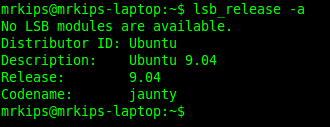
The lsb_release utility which is part of all Linux distributions which adhere to the LSB specification will print distribution specific information. Check the lsb_release manpage for details on usage. Example screenshots of using lsb_release on Ubuntu and Fedora distributions are given below:

OPTION 2: Check release files in /etc.
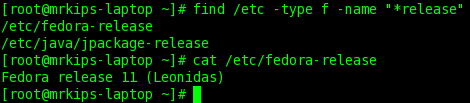
Linux distribution vendors typically include release files with details about the distribution, in the /etc directory. Screenshots of examples showing how to check such files on Ubuntu and Fedora are given below: